Restaurant POS softwareRun the floor, the kitchen and the till from one POS
TapNtrade is a restaurant point of sale that connects waiters, chefs and cashiers in real time. Orders go from the table to the kitchen display to the bill without anyone re-typing them, and the owner sees revenue and profit as each bill is paid.
 Book a demo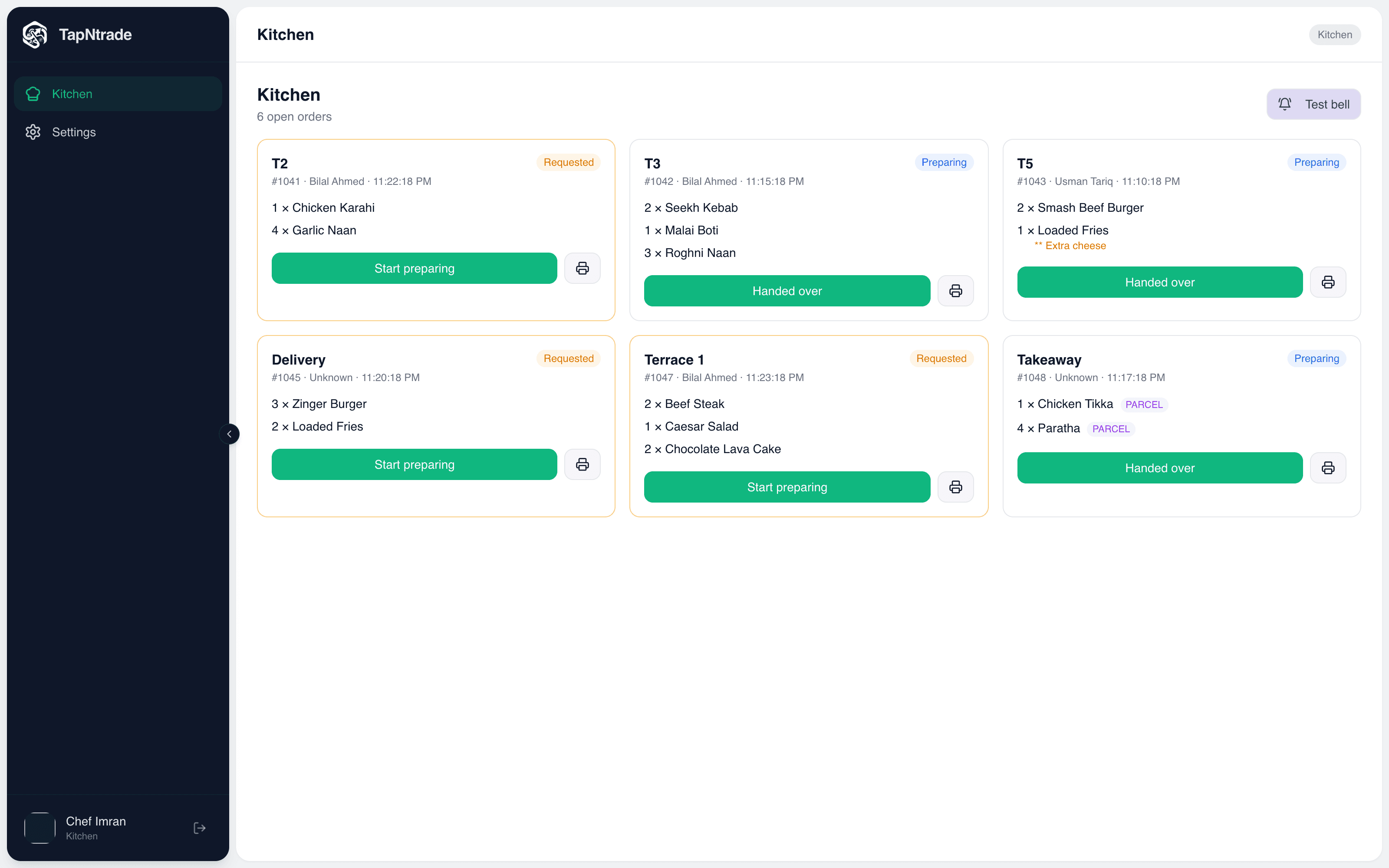
Built for every kind of restaurant
- Cafes
- Dine-in restaurants
- Fast food & pizza
- BBQ & karahi
- Bakeries & desserts
- Food courts
- Cloud kitchens
- Takeaway & delivery
Restaurant features
Everything a restaurant POS should do
Every part of service has its own screen, and they all update each other live.
Table management
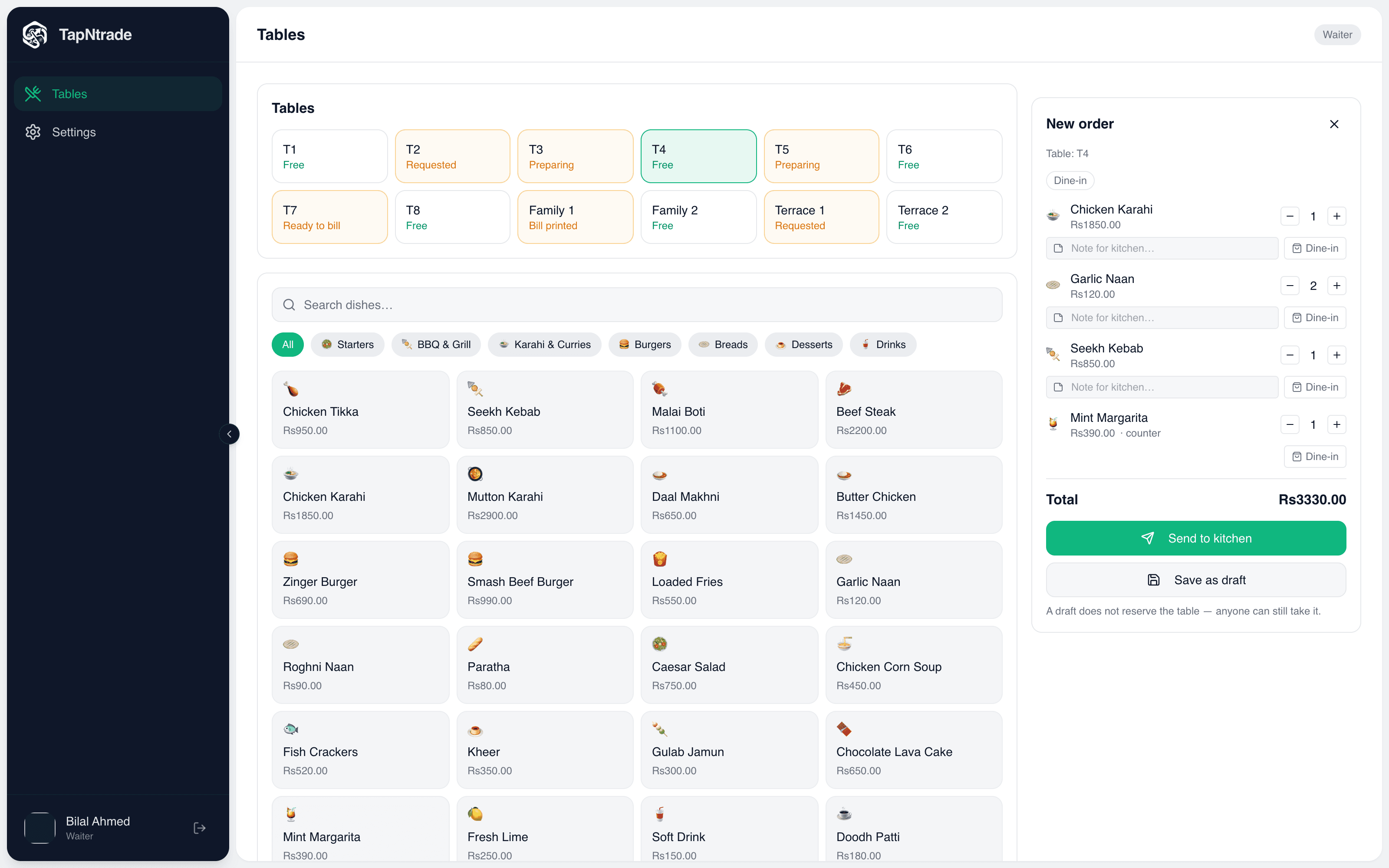
A live table map shows which tables are free, have ordered, are cooking, are ready to bill or have a printed bill. Name tables and areas any way you like.
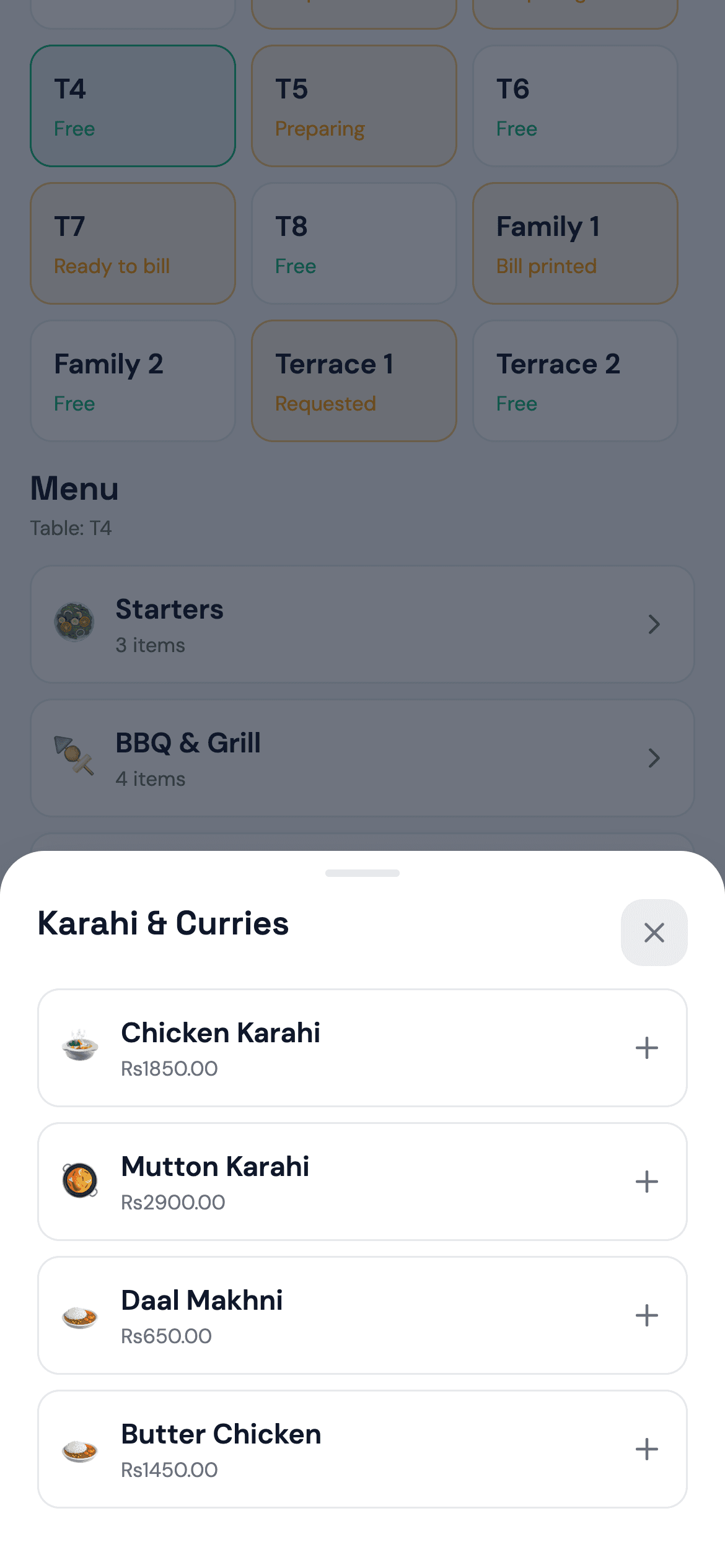
Waiter ordering app
Waiters pick a table, tap dishes by category, add kitchen notes and parcel flags, and send. Drafts can be saved, and extra rounds are added to the same order.
Kitchen display system
Tickets arrive instantly with a bell. Chefs move each order from requested to preparing to handed over, and a new round shows only the new lines.
Kitchen tickets & receipts
Print kitchen tickets and customer bills on 58 mm or 80 mm thermal printers over USB, network or Bluetooth. Your logo and address go on the receipt.
Fast billing & split payments
Print the bill, apply a discount, then settle by cash, card, online or a split across methods. The table frees itself once the order is paid.
Takeaway & delivery
Cashiers punch takeaway and delivery orders with customer details and delivery charges. Drinks-only orders skip the kitchen.
Recipe inventory
Track ingredients by weight, volume or pack. Each dish's recipe deducts stock automatically when it's paid for, and low stock is flagged.
Cashier shifts
Open with a float and close with a count. See each cashier's takings, the variance and the cash still to be collected.
Sales & profit reports
Revenue, cost of goods, gross and net profit, top dishes, and breakdowns by cashier, waiter and order type, from today to all time.
Staff roles
Owner, supervisor, cashier, waiter and kitchen accounts each open on their own screen. Extra modules can be granted to individual staff.
Order history & audit
Every order keeps its full history: what was added or removed, by whom and when, plus every bill print.
Dine-in, parcel, takeaway, delivery
All four order types are handled in one flow, and every report shows the mix.
The workflow
Follow one order end to end
Scroll through what happens between a customer ordering and the money reaching your dashboard.
Waiter screen
Take the order at the table
The waiter picks a free table and taps dishes from the menu. Notes for the kitchen and parcel items are added per line.
- Save as a draft or send straight away
- Add more rounds to the same table later
- Works on a phone, tablet or browser
The kitchen sees it instantly
The ticket lands on the kitchen board with a bell and can print on the kitchen printer. Chefs tap once to start and once to hand over.
- Table, waiter, time and notes on every ticket
- Drinks-only orders skip the kitchen
- A new round sends only the new lines
Ready to bill, in one list
Every unpaid order appears under Current Orders at the till, whether a waiter or another cashier started it. The cashier also punches takeaway and delivery orders here.
- Status of every order at a glance
- Search by table, number or customer
- Delivery orders carry address and charges
Print the bill, then settle
The cashier prints the bill with any discount, then marks it paid by cash, card, online or a split. The table is freed and ingredient stock comes off by recipe.
- Thermal receipts over USB or Bluetooth
- Split payments that must add up
- Edit items or cancel with a full audit trail
The owner sees the numbers move
Revenue, cost of goods, gross and net profit update as each bill is settled. See who is on the till, who still owes cash, and which dishes sell.
- Today, this month, up to all time
- Breakdowns by cashier, waiter and order type
- Shift variance and cash still to collect
Take the tour
See every screen
These are real screens from the TapNtrade web and mobile apps, shown with sample data. Hover to zoom in, or click to open any screen full size.
FAQ
Restaurant POS questions
What does a restaurant POS system do?
A restaurant POS takes orders, sends them to the kitchen, prints the bill and records the payment. TapNtrade also tracks tables, ingredient stock, cashier shifts, expenses and profit, so the whole restaurant runs from one system.
Does TapNtrade have a kitchen display system (KDS)?
Yes. The kitchen screen shows every open ticket with its table, waiter, notes and parcel flags, and rings a bell when a new order arrives. Chefs tap once to start an order and once to hand it over. Tickets can also print on a kitchen printer.
Can waiters take orders on their phones?
Yes. Waiters use the TapNtrade app on Android or iOS, or a browser, to pick a table, add dishes with notes and send the order to the kitchen. They can add more rounds to the same table later.
Does it handle takeaway and delivery?
Yes. The cashier punches takeaway and delivery orders directly, with the customer's name, phone and address, a discount and a delivery charge. Customer details are saved and suggested next time.
How does recipe-based inventory work?
Add your ingredients in grams, millilitres, pieces or packs, then attach a recipe to each dish. When an order is paid, TapNtrade deducts the ingredients automatically and flags anything that is running low.
Can I track what each cashier collected?
Yes. With shifts turned on, cashiers open a drawer with a float and close it with a cash count. You see cash, card and online takings per cashier, the expected cash, any shortage or excess, and what is still to be handed over.
What restaurants is TapNtrade suitable for?
Cafes, fast food, dine-in restaurants, BBQ and karahi houses, pizzerias, bakeries, dessert shops, food courts and cloud kitchens. Anywhere with tables, a kitchen and a till.
Ready to take your first order?
Sign in to TapNtrade, or message us and we'll set up your store, whether it's a restaurant or a shop.